Text Message Consent Form
A caregiver opts in to work text messages in one of two ways, each described on its own below: on paper, with this form, or in the HomeCareBilling caregiver app. HomeCareBilling texts no caregiver whose record does not show consent on file.
On paper. A home care agency that uses HomeCareBilling writes its name in the blank and puts this form in each caregiver's hiring packet. A caregiver who wants texts ticks the box, writes their mobile number, and signs and dates it. The agency keeps the signed form in the caregiver's file and marks the consent on the caregiver's record.
How opt-in works is set out in our Terms of Service (section 9), and how mobile numbers are protected in our Privacy Policy (section 3.5).
Consent to Work Text Messages (SMS)
Optional. Consent is not a condition of employment.
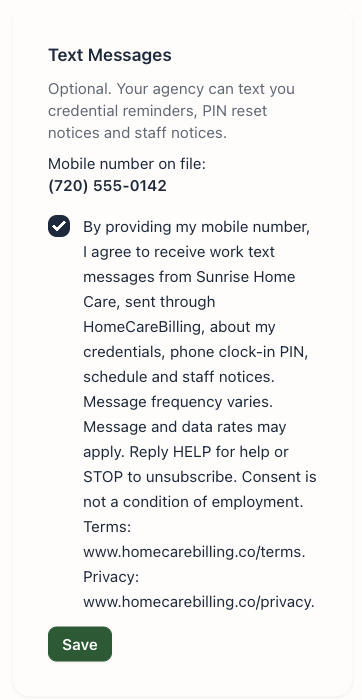
By providing my mobile number, I agree to receive work text messages from (agency name), sent through HomeCareBilling, about my credentials, phone clock-in PIN, schedule and staff notices. Message frequency varies. Message and data rates may apply. Reply HELP for help or STOP to unsubscribe. Consent is not a condition of employment. Terms: www.homecarebilling.co/terms. Privacy: www.homecarebilling.co/privacy.
Messages: credential expiry reminders, phone clock-in PIN reset notices (never the PIN itself), schedule and staff notices. No marketing. Reply STOP at any time to stop, HELP for help, or email support@homecarebilling.co.
In the caregiver app
A caregiver who uses the HomeCareBilling caregiver app can opt in under Profile › Text Messages. The screen shows the mobile number on file and the same statement with the agency's name. The caregiver ticks the box and taps Save; HomeCareBilling records the date and the exact statement agreed to. The same screen has Stop text messages, which withdraws consent.